
Introduction
When investigating compromised email accounts, one pattern appears repeatedly:
The account password was weak enough to be guessed, reused from another service, or simple enough to be remembered.
The victim often says:
“I didn’t share my password with anyone.”
They may be correct. The password was simply too predictable.
Many people and organizations still rely on employees remembering passwords, storing them in notebooks, spreadsheets, browser notes, chat messages, or informal documents. While this may seem convenient, it creates significant security risks that can lead to compromised email accounts, stolen data, financial loss, and operational disruption.
A password manager allows everyone to use unique, randomly generated passwords for every service without having to remember them. For organizations, password managers also provide a secure way to share credentials and maintain access control.
For small and medium-sized businesses, a password manager is no longer a luxury. It is a basic security requirement.
The Problem With Memorable Passwords
Humans are not good at creating secure passwords.
When asked to create a password they can remember, most people choose-
Something based on:
- Names
- Birthdays
- Phone numbers
- Company names
- Common words
- Predictable substitutions
Such as replacing “a” with “@”
Examples include:
- Summer2025
- Dhaka123
- Company@123
- Password123
- Admin2024
These passwords may look unique to the user, but attackers test millions of similar combinations every day.
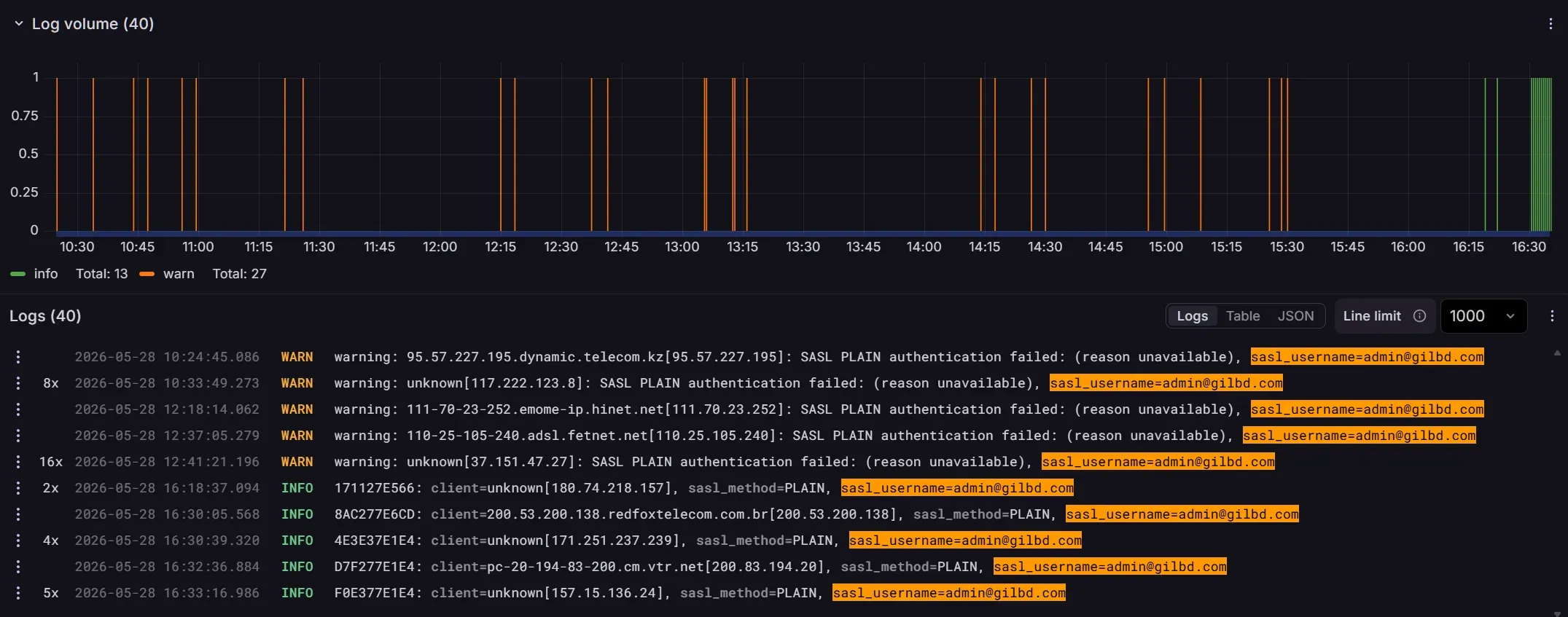
Modern password attacks are highly automated. Attackers use tools that can attempt enormous numbers of password combinations against exposed services, leaked databases, and compromised websites.
The result is simple:
If a password can be remembered easily, there is a good chance it can be guessed more easily than the owner expects.
Password Reuse Makes Everything Worse
Even when a password is reasonably strong, many users make another critical mistake:
They reuse the same password across multiple services.
For example:
- Email account
- ERP system
- Company VPN
- Hosting panel
- E-commerce account
If just one service suffers a data breach, attackers gain access to the password. They then try the same email address and password combination on other services. This attack is known as credential stuffing.
The user may believe:
“My email provider was hacked.”
In reality, the password may have leaked years earlier from an unrelated website.
Because the same password was reused everywhere, the attacker only needed one successful breach.
Why Email Accounts are Targeted?
Emails are Valuable
A compromised email account is often far more dangerous than a compromised social media account. Email is usually the recovery mechanism for every other service. If an attacker gains access to a user’s email account, they can often:
- Reset passwords for other services
- Access confidential business communications
- Read invoices and financial information
- Impersonate employees
- Send phishing emails to customers
- Take over cloud services
In many incidents, the initial compromise is not the final objective.
The email account is simply the first step.
Email Servers are Easier Targets Too
Email protocol is one of the oldest and simple protocol still in use today. In absence of technologies like CSRF, WAF etc. which are used in modern applications, any hacker can brute-force the victim’s email server with botnets (random IPs) and easily break a simple password.
Why Password Rules Are Not Enough
Many organizations and service providers enforce rules such as:
- Minimum 8 characters
- One uppercase letter
- One number
- One special character
While these policies are better than having no policy at all, they often produce predictable passwords such as:
- Welcome@123
- Company@2025
- Password#1
Users are forced to satisfy technical requirements but still create passwords they can remember. The underlying problem remains. People cannot realistically remember dozens or hundreds of truly random passwords.
The Password Manager Solution
A password manager solves this problem by generating and storing passwords securely.
Instead of remembering every password, users only need to remember one strong master password.
The password manager can then create passwords such as:
u87VXCNYNi8^U8S$enC5fg3r
!QT2lE!f$8QMbFRvI7CU7Ozz
VXJum!#^k&uPN%##4KTW1giZ
These passwords are extremely difficult to guess and can be unique for every service.
The user does not need to memorize them.
The password manager handles that responsibility.
Benefits for Individual Users
A password manager provides several important advantages:
- Unique Passwords Everywhere. Every account receives a different password.
- A breach on one service does not automatically compromise other accounts.
- Strong Random Passwords. Users no longer need to invent passwords themselves. The software generates stronger passwords than most people would create manually.
- Faster Logins. Many password managers support browser integration and autofill features. This reduces frustration while improving security.
- Secure Storage. Passwords are stored in an encrypted vault rather than notebooks, spreadsheets, or chat applications.
Why Organizations Need Shared Password Management
Many companies understand the need for personal password storage but overlook another major problem:
Shared credentials.
Examples include:
- Hosting control panels
- Domain registrars
- Corporate social media accounts
- Shared email accounts
- Server administration accounts
- Third-party service portals
Too often these passwords are shared through:
- Messenger
- Slack messages
- Excel spreadsheets
- Printed documents
Each method introduces significant risk.
Once a password has been copied into multiple places, nobody truly knows who has access to it anymore.
The Dangers of Informal Password Sharing
Consider a common scenario:
- An administrator sends a server password via chat.
- Another employee copies it into a document.
- The document is emailed to a contractor.
- The contractor leaves the project.
- Nobody rotates the password.
Months or years later, that credential may still provide access to critical systems.
The organization loses visibility and control.
This is one of the most common causes of long-term security exposure.
Shared Collections Solve This Problem
Modern password managers support shared collections, groups, or organizational vaults.
Instead of sending passwords to individuals, the password is stored in a central shared vault.
Authorized users can access the credential when needed.
Benefits include:
- Centralized Access Control. Administrators determine who can access which credentials.
- Easier Employee Dismissal. When an employee leaves, their access can be removed immediately. Passwords do not need to be redistributed.
- Reduced Password Exposure. Credentials are never scattered across emails, chat histories, and documents.
- Better Accountability. Organizations gain visibility into who has access to sensitive credentials.
The Principle of Least Privilege
Not every employee should have access to every password.
A good password management system allows organizations to separate credentials into-
Collections based on:
- Department
- Team
- Project
- Responsibility
For example:
- Marketing team passwords
- Finance systems
- Infrastructure credentials
- Customer support tools
This limits the impact of compromised accounts and reduces unnecessary exposure.
Password Managers Do not Replace MFA
A password manager significantly improves security, but it should be combined with Multi-Factor Authentication (MFA).
MFA requires an additional verification method, such as:
- Authenticator applications
- Security keys
- Hardware tokens
Even if a password is stolen, MFA can help prevent unauthorized access.
The strongest approach is:
- Unique random passwords
- Password manager storage
- Multi-factor authentication
Together, these provide substantially better protection than passwords alone.
Common Objections
Our Team Is Too Small
Small organizations are often targeted because they typically have fewer security controls.
A team of five people can benefit from a password manager just as much as a team of five hundred.
We Already Use Browser Password Storage
Browser storage is useful, but it generally lacks the organizational controls, sharing capabilities, auditing features, and access management required by businesses.
It Seems Complicated
Most users adapt to password managers within a few days.
After that, logging in often becomes easier, not harder.
Final Thoughts
Many security incidents begin with a single weak password.
A compromised email account, server login, hosting panel, or business application can create consequences that extend far beyond the original account.
The traditional approach of memorizing passwords and sharing them through email or chat is no longer sufficient.
Organizations should adopt a password manager, encourage the use of unique random passwords, enable multi-factor authentication, and use shared collections for credentials that must be accessed by multiple team members.
Security does not start with firewalls or antivirus software.
It starts with controlling access.
And controlling access starts with managing passwords properly.